 moosik
Which YouTube Music songs do you keep playing all the way through?
Find the songs you finish most on desktop, see their full-listen counts, and earn a record sleeve when one reaches ten.
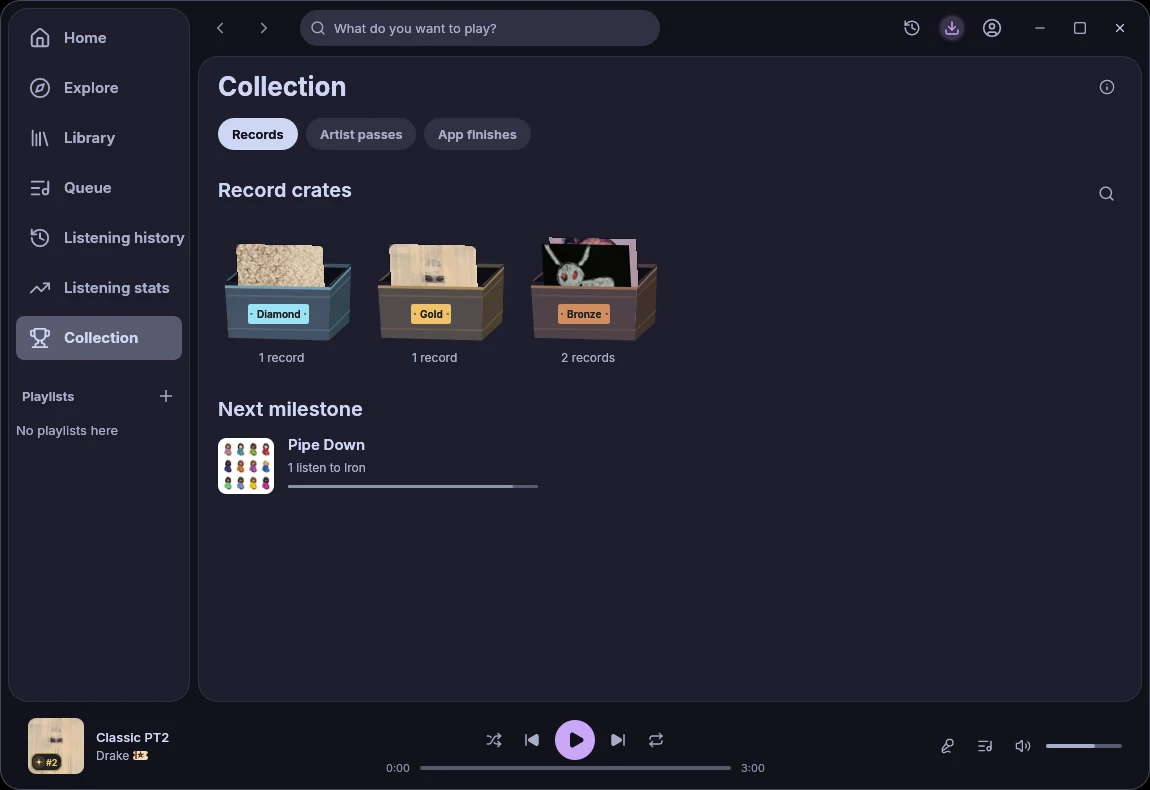
Open Collection → Records in Moosik to see which songs you’ve finished again and again. A song earns its first sleeve after ten full listens recorded on this computer. To count shorter plays or check just the past week, open Listening stats → Songs and choose a date range.
Find the song closest to its first record
On a new installation, Records shows the target for your first Iron sleeve. As you listen, Next milestone shows which song is closest to its next tier. For a four-minute track, hearing at least 3 minutes 36 seconds of distinct audio in one ended session counts as a full listen. Repeating just the chorus adds listening time. See how plays, skips and full listens are counted.
What comes after ten listens?
Iron starts at 10 full listens to one song, Bronze at 25, Silver at 50 and Gold at 100. Platinum takes 250, Double Platinum 500 and Diamond 1,000. Use the magnifying glass in Records to find a song across crates. The totals cover the history recorded in this Moosik installation. For earlier listening or songs played on your phone, check your YouTube Music history if it was enabled.
See an artist you keep coming back to
Open Collection → Artist passes. An artist earns their first pass after you play ten distinct songs by them or listen to them on five different days. Later stamps mark 15, 30 and 60 listening days. For a ranked list within a week or month, switch to Listening stats → Artists and set the dates. See the Collection update and gallery.